
There's a particular kind of frustration that comes from waiting 30 minutes to deploy a one-line CSS fix.
At Levels.fyi, our frontend is a Next.js application inside a monorepo. It shares TypeScript libraries with the backend, pulls packages from a private npm registry, and deploys via AWS ECS. For a long time, every change—no matter how small—triggered a build that took up to 30 minutes.
A one-line CSS fix. A typo correction. A config tweak. Half an hour.
When your deploys take that long, you start batching changes. You hold off on shipping small fixes and merge more into each deploy, which makes each deploy riskier. The slow build was shaping how the team shipped code.
The instinct was to blame the codebase. But after digging in, the root causes were spread across three layers: the Dockerfile, the CI configuration, and the hardware running it. Fixing only one would have left most of the gains on the table.
By the end, we got code-only changes down to ~46 seconds and worst-case cold builds to ~5 minutes.
Here's how.
Where Time Was Actually Going
Before reaching for solutions, we instrumented the pipeline and broke it into phases: runner setup, Docker daemon initialization, the build itself (deps → compile → bundle), image push, and ECS deploy.

Every phase had waste:
- The Dockerfile was busting cache on trivial source changes, forcing a full codenpm install every build
- The CI cache was routing gigabytes of layer data through slow artifact storage
- The runner was spending more time setting up Docker than actually building
- The hardware was undersized and building the wrong architecture via emulation
Fix 1: The Dockerfile Was Fighting Against Itself
The Original Structure
The original build mixed source files and dependency manifests in the same COPY steps:
FROM node:20-alpine AS base

# Copies source AND manifests together — fatal for caching
COPY libs/ /app/libs/
COPY apps/frontend/ /app/apps/frontend/

# Installs AND compiles in one shot
RUN cd /app/libs/constants && yarn install && yarn compile && rm -rf node_modules
RUN cd /app/libs/interfaces && yarn install && yarn compile && rm -rf node_modules
RUN cd /app/ && yarn install && yarn compile && rm -rf node_modules

FROM base AS builder
RUN yarn install
RUN yarn build
Docker layer caching works by hashing the inputs at each step. The moment a COPY brings in source files alongside package.json, any code change invalidates the install step below it. Every build was doing a full yarn install from scratch.
The Fix: Four Stages, Ordered by Rate of Change
The core principle: things that change rarely go at the top; things that change constantly go at the bottom.
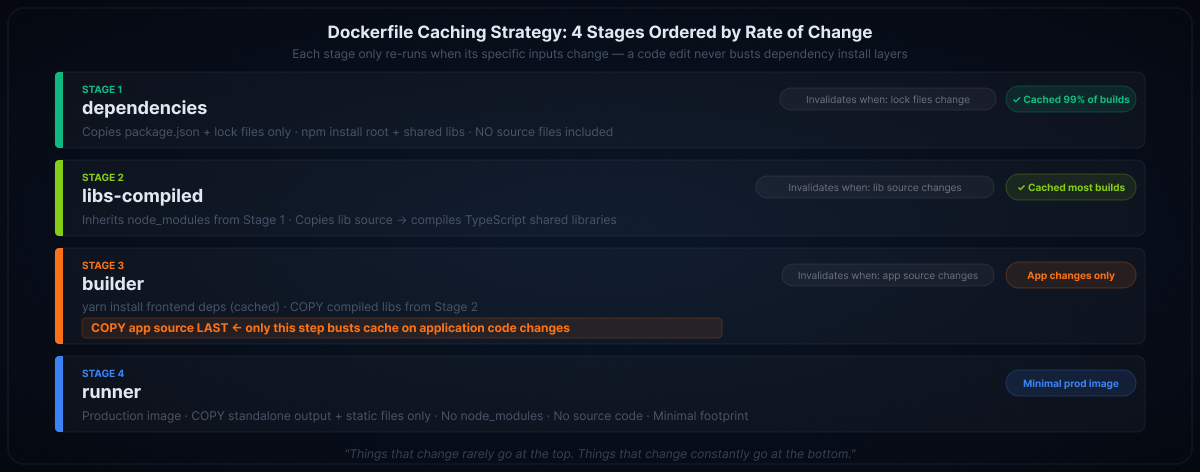
Stage 1 — Dependencies: Copy only manifests and lock files, then install. This layer only busts when dependencies actually change.
FROM node:24-slim AS dependencies

COPY package.json package-lock.json tsconfig.json /app/
COPY libs/constants/package.json libs/constants/package-lock.json /app/libs/constants/
COPY libs/interfaces/package.json libs/interfaces/package-lock.json /app/libs/interfaces/

RUN cd /app/libs/constants && npm install
RUN cd /app/libs/interfaces && npm install
RUN cd /app && npm install
Stage 2 — Library compilation: Inherits installed deps, copies library source, compiles. Source changes here only invalidate compilation, not installation.
Stage 3 — Builder: Installs frontend deps (stable), receives compiled libs, then copies application source last (volatile).
FROM dependencies AS builder
WORKDIR /app/apps/frontend/src

COPY apps/frontend/src/package.json apps/frontend/src/yarn.lock ./
RUN yarn install

COPY --from=libs-compiled /app/libs /app/libs
COPY apps/frontend/ ./../

ENV NODE_ENV=production
RUN --mount=type=cache,target=/app/apps/frontend/src/.next/cache,sharing=locked \
yarn build
Stage 4 — Runner: Minimal production image with only the build output.
The BuildKit Cache Mount
The --mount=type=cache on the build step is easy to miss but critical:
RUN --mount=type=cache,target=/app/apps/frontend/src/.next/cache,sharing=locked \
yarn build
Next.js maintains an incremental build cache in .next/cache. Without this mount, that cache is thrown away at the end of every container build. With it, the cache persists across CI runs on the same runner — you get incremental page compilation rather than a full rebuild every time. This is what gets code-only changes under 1 minute.
Fix 2: The CI Cache Strategy Was Wrong
The Original Approach
cache:
key: buildx-cache-prod
paths:
- .buildx-cache/

script:
- docker buildx build \
--cache-from type=local,src=$CI_PROJECT_DIR/.buildx-cache \
--cache-to type=local,dest=$CI_PROJECT_DIR/.buildx-cache,mode=min
Docker build caches are gigabytes. GitLab CI artifact storage isn't on the same network as the build runner. Every job started by downloading the cache; every job ended by uploading it back. The transfer overhead frequently exceeded the time saved by having the cache at all.
To make things worse, the cache key contained a / character, which GitLab silently rejected. The cache was never actually loading. Every build was cold.
The Fix: ECR Registry Cache
docker buildx build . \
--cache-from type=registry,ref=$REGISTRY/your-app:buildcache \
--cache-to type=registry,ref=$REGISTRY/your-app:buildcache,mode=max \
--tag "$REGISTRY/your-app:$COMMIT_SHA" \
--push
Two changes:
- Registry cache instead of local filesystem. ECR sits on the same AWS network as the runner. Cache reads and writes happen at internal network speed — no artifact upload/download at job boundaries.
mode=maxinstead ofmode=min. mode=min only caches the final image layers. mode=max caches all intermediate layers — dependencies, compiled libs, builder. Each stage benefits from cache independently.
We also switched from mutable latest tags to commit-SHA-tagged images with explicit task definition updates. This gave us full deployment traceability and trivial rollbacks — point the ECS service at any previous revision.
Fix 3: The Runner Was Adding Unnecessary Overhead
From Docker-in-Docker to Shell Executor
Our GitLab runner was using Docker-in-Docker (dind) mode. Every CI job paid the cost of:
- Spinning up a fresh docker:dind service container
- Starting a new Docker daemon from scratch
- Pulling gigabytes of layer cache from ECR into that fresh daemon
- Building — finally
- Discarding the daemon and all cached layers at job end
Step 3 alone was often taking longer than the actual build. The cache existed, but loading it into a fresh daemon each run negated most of the benefit.
Shell executor eliminates this entirely. The runner executes build scripts directly on the host, talking to the persistent host Docker daemon. BuildKit's layer cache accumulates on disk and carries over between jobs automatically.
# Before: Docker executor with dind service
services:
- docker:24.0-dind
variables:
DOCKER_HOST: tcp://docker:2375

# After: shell executor — no services block needed
Tradeoff: Jobs share the host environment, so you need discipline around cleanup. For a dedicated build runner, this is almost always the right call.
ARM Architecture + Right-Sized Hardware
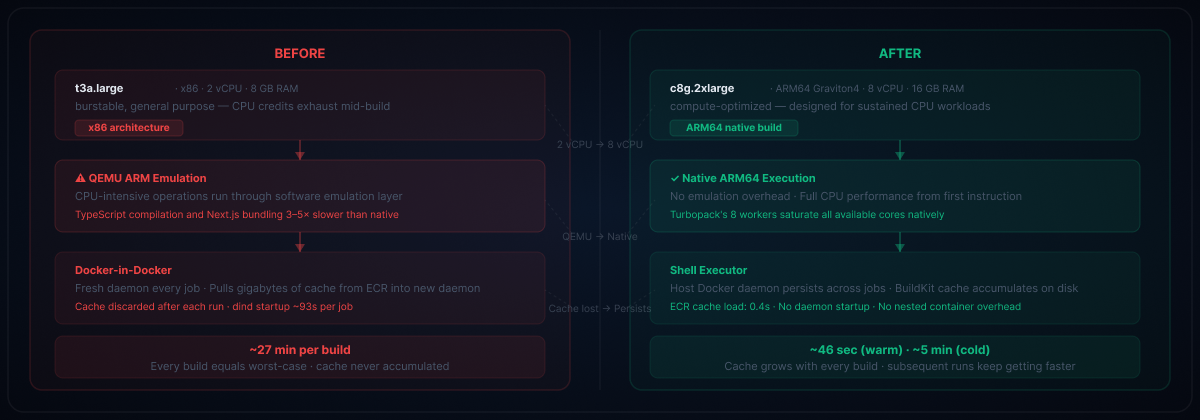
The runner was a t3a.large — burstable, general-purpose x86 with 2 vCPU and 8 GB RAM. But production runs on ARM (AWS Graviton). Building an ARM Docker image on an x86 machine requires QEMU emulation, which is dramatically slower for CPU-intensive work like TypeScript compilation and bundling.
We moved to a c8g.2xlarge: compute-optimized, ARM64/Graviton4, 8 vCPU, 16 GB RAM.
FROM --platform=linux/arm64 node:24.12-slim AS dependenciesWhat changed:
- No more QEMU — compilation runs at native speed
- 4× the vCPU — parallel workers can actually saturate available cores
- Compute-optimized class — designed for sustained CPU workloads, not burstable credits that exhaust mid-build
- Better price/performance — Graviton instances are generally cheaper than equivalent x86
We also switched the base image from Alpine to Debian slim. Alpine uses musl libc, which has compatibility quirks with some native Node.js addons. Debian slim is more broadly compatible and better tested with the Node.js ecosystem.
Fix 4: Next.js 16 + Turbopack
This was the single biggest lever.
We upgraded from Next.js 15 to Next.js 16 to take advantage of Turbopack, a Rust-based bundler that replaces webpack. The difference was immediate:
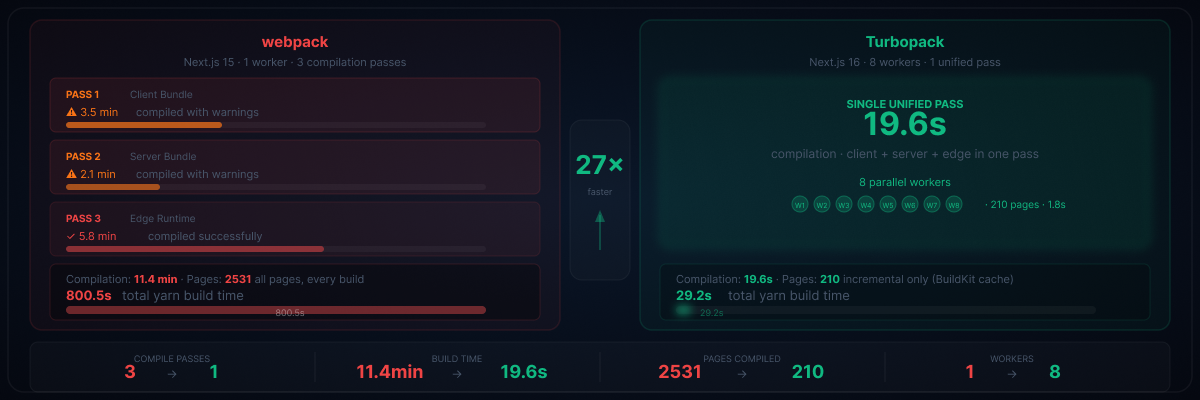
The old webpack build ran three separate compilation passes: client bundle (~3.5 min), server bundle (~2.1 min), edge runtime (~5.8 min) — totaling ~11.4 minutes of compilation alone, before generating static pages. Turbopack does a single unified pass in 19.6 seconds.
On top of that, the old build compiled all 2,531 static pages from scratch on every run. Turbopack, with its incremental engine and the persisted .next/cache from Fix 1, only recompiled pages touched by the change — 210 pages generated by 8 parallel workers in 1.8 seconds.
That combination — fewer passes, faster compilation, incremental pages, more workers — is where the 27× improvement on the build step came from.
We also upgraded Node.js from v20 to v24, partly for security patches and partly for V8 improvements that reduce memory pressure during compilation.
Fix 5: Memory Configuration
A subtle one. The Dockerfile had a hardcoded heap limit tuned for production that was causing OOM kills in test environments with smaller ECS task sizes:
# Before: hard-coded, caused OOM on smaller tasks
ENV NODE_OPTIONS="--max-old-space-size=6144"

# After: auto-detect at build time, configurable at runtime
ARG MAX_OLD_SPACE_SIZE=1536
ENV NODE_OPTIONS="--max-old-space-size=${MAX_OLD_SPACE_SIZE}"
At build time, Node.js auto-detects from available container memory. At runtime, the limit is passed as a build argument so each environment can tune independently.
The Results: Before and After
The best way to see the impact is the actual build logs.
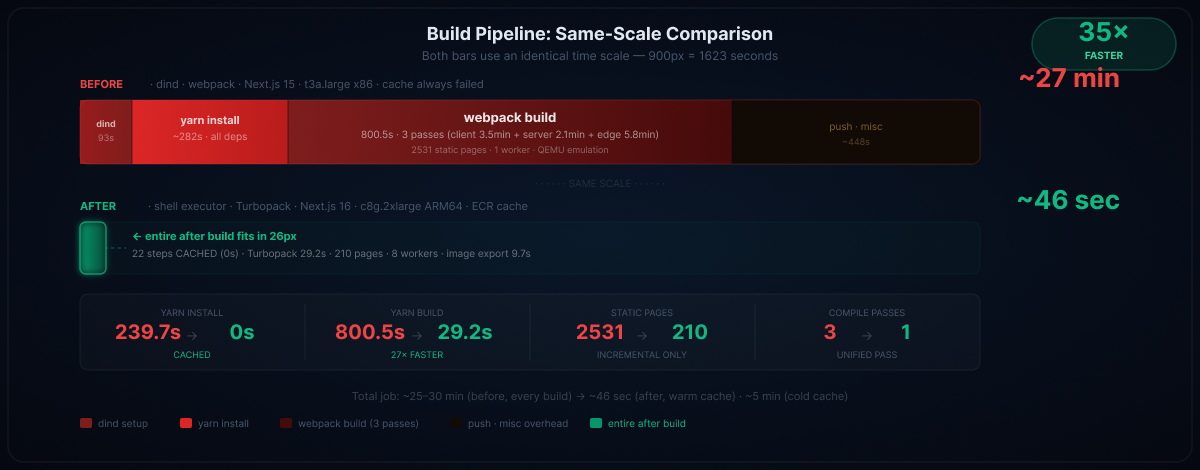
Before: Every Build From Scratch (~28 min)
── Runner setup ─────────────────────────────────────────
Pulling docker:dind service image              ~22s
Pulling aws-base image                         ~18s
Pulling frontend:latest (16 layers)            ~45s
Starting fresh Docker daemon                    ~8s
⚠ GitLab cache restore: FAILED
"cache key must not contain '/'"             [never loaded]
── Build ────────────────────────────────────────────────
yarn install (libs/constants)                  21.3s
yarn install (libs/interfaces)                  8.2s
npm install  (root)                             3.6s
yarn install (frontend + FontAwesome Pro)     239.7s  ← ~4 min
yarn build   (webpack, Next.js 15)            800.5s  ← ~13 min
Pass 1: client bundle                      3.5 min
Pass 2: server bundle                      2.1 min
Pass 3: edge runtime                       5.8 min
Static pages: 2531 (single worker)
─────────────────────────────────────────────────────────
Full job total:                              ~25–30 min
After: Code-Only Change, Warm Cache (~46 sec)
── Cache ────────────────────────────────────────────────
Importing cache manifest from ECR               0.4s
── Build (22 of 28 steps CACHED) ───────────────────────
[dependencies] all installs                  → CACHED
[libs-compiled] all compiles                 → CACHED
[builder] yarn install (frontend deps)       → CACHED
[builder] COPY application source               1.6s  ← only miss
[builder] yarn build (Turbopack, 8 workers)     29.2s
Compiled successfully                       19.6s
Generated 210 static pages (8 workers)       1.8s
Finalization                                 7.8s
── Push ─────────────────────────────────────────────────
Export image + write cache to ECR               9.7s
─────────────────────────────────────────────────────────
Total job: ~46 sec- Worst-case (cold build): ~30 min → ~5 min (6× faster)
- Code-only change (warm cache): ~30 min → ~46 sec (~39× faster)
Key Takeaways
- Order Dockerfile layers by rate of change. Lock files at the top, source at the bottom. If RUN npm install comes after a COPY that includes source files, you're doing a full reinstall on every build.
- Separate concerns into stages.A UI code change shouldn't invalidate library compilation. Fine-grained stages give you fine-grained cache hits.
- Cache location matters as much as cache strategy. ECR on the same network as your runner eliminates artifact transfer overhead. mode=max caches all intermediate layers, not just the final image.
- Docker-in-Docker has a hidden fixed cost. Every job pays for a fresh daemon and full cache hydration. A persistent host daemon eliminates this entirely.
- Build on the architecture you deploy to. QEMU emulation is slow for CPU-intensive work. If you deploy ARM, build on ARM.
- Don't underestimate your tools. The Next.js/Turbopack upgrade was the single biggest driver — collapsing yarn build from 800 seconds to 29. But it needed the right infrastructure underneath it to fully deliver. Neither tooling nor hardware alone would have gotten us here; it was the combination.
No single fix was responsible. The 30-minute build was death by a thousand cuts, and fixing it required addressing every layer — from how we structured our Dockerfile to what CPU architecture was running the build. The satisfying part is that each fix compounded on the others: better caching made the faster bundler's incremental mode actually work, which made the faster hardware actually matter.
If your builds are slow, resist the urge to upgrade one thing and call it done. Instrument the whole pipeline, find where time actually goes, and fix all of it.